Installing a UniFi Network in a Brickell Condo: The Complete Guide (2026)
Technically reviewed by Jason Tyndall, Founder & Lead Technician
A Brickell condo is one of the hardest places in Florida to get good Wi-Fi. Post-tensioned concrete slabs, floor-to-ceiling impact glass, a provider router in a utility closet and a few hundred neighbors on the same channels add up to the same complaint: fast speed next to the router, dropouts on the balcony and in the primary bedroom. This guide explains how we design and install a Ubiquiti UniFi network in a high-rise condo, what the building will ask of you, and what to expect on installation day. We serve Miami-Dade by scheduled appointment from Naples; the process below is the one we use for every UniFi installation in Miami.
Why mesh pods struggle in a high-rise
Plug-in mesh systems rely on a wireless link between nodes. In a concrete-and-glass condo that link is exactly what fails: the slab and the demising walls between units absorb 5 GHz signal, and the glass reflects it. Each wireless hop also halves the available bandwidth, so a gigabit building connection turns into a hundred megabits in the back bedroom. The other problem is density. A 40-storey tower has hundreds of networks competing on the same channels, and consumer gear picks channels automatically with no visibility into what the neighbors are doing.
A UniFi system solves both problems the same way a commercial network does: every access point is wired back to a switch, and channel width, transmit power and band steering are set deliberately for the unit. Two correctly placed, wired access points outperform four wireless mesh pods in almost every condo we have measured.
Step 1: Find where the internet actually enters
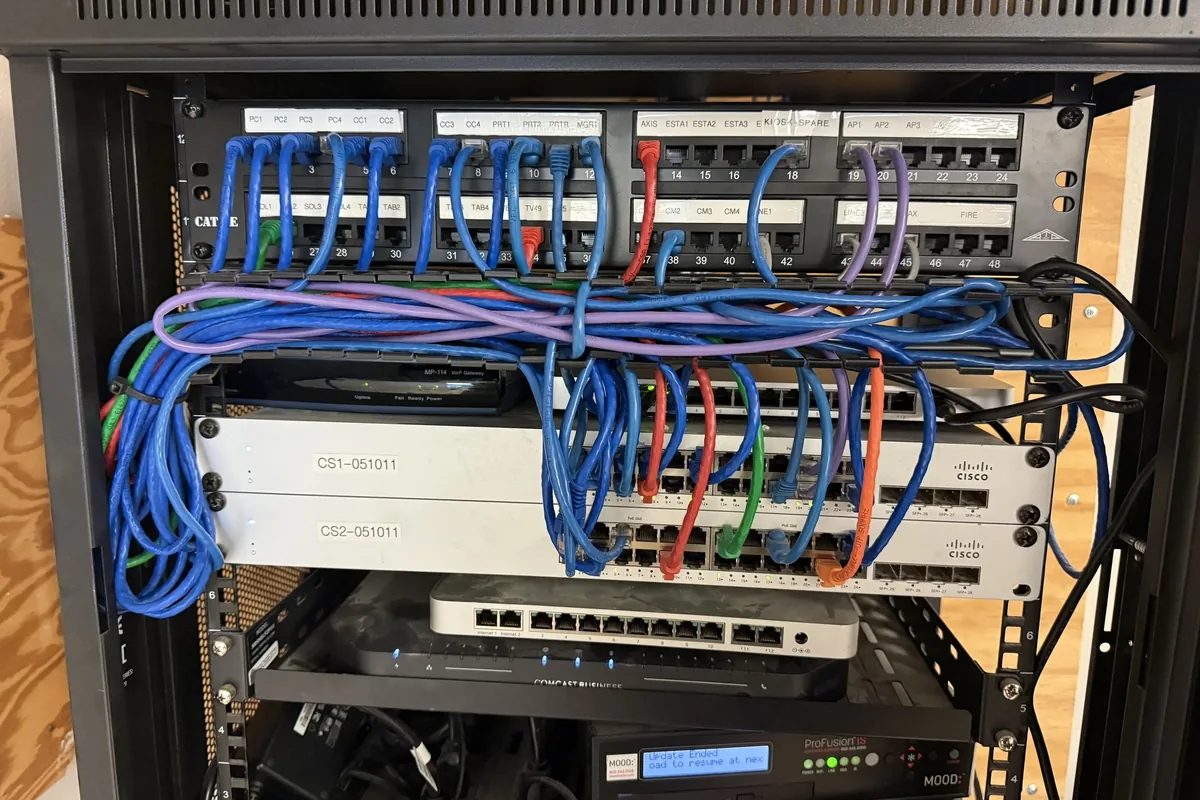
Most Brickell buildings deliver internet one of three ways: a bulk fiber agreement with a single provider (common in newer towers), a coax drop in a structured-wiring panel (usually a Leviton or OnQ enclosure in a closet), or a provider ONT installed in the unit. The first thing we document on a video walkthrough is that panel. If the unit has Cat5e or Cat6 runs from the panel to each room, the hard part is already done: the panel becomes the network core. If it does not, we plan the shortest cable paths to the two or three places an access point needs to live.
Step 2: Design around the floor plan, not the square footage
A 1,400 square foot condo often needs two access points, not because of distance but because of layout. A split-bedroom plan with the kitchen core in the middle puts a block of cabinets, appliances and plumbing between the living area and the primary suite. Our rule for Brickell plans is one ceiling or wall access point serving the living room and balcony, and a second serving the bedroom wing, both wired. For units over about 2,000 square feet, penthouses or two-storey lofts, a third access point covers the upper level or the far bedroom.
Equipment we specify for most condos: a UniFi Cloud Gateway (routing, firewall, VPN and the controller in one small box), a PoE switch sized for the access points plus a few wired devices like a TV, Sonos Port or desktop, and U7 Pro or U7 Pro Max Wi-Fi 7 access points. Where there is no attic access, we use the U7 Pro Wall, which mounts to a standard single-gang box where an old phone or data jack already exists.
Step 3: Clear the building requirements before booking
Every Brickell association we have worked with asks for the same things, and they take longer than the installation itself if left to the last minute: a certificate of insurance naming the association, a work order approved by management, an elevator or loading dock reservation, and work hours (usually weekdays between 9 and 5, no weekends). Some buildings prohibit any penetration of the demising walls or ceiling slab; in those cases we route cable in paintable raceway along the top of the baseboard or inside existing conduit. We handle this paperwork as part of the scope so the installation day is not lost to a security desk.
Step 4: Installation day
Because Miami projects are scheduled as a block, a typical condo installation is one day. The sequence: mount the gateway and switch in the structured-wiring panel or a small media cabinet, terminate and test every cable run, mount the access points, then adopt everything into the UniFi app. We separate networks before any device joins: a primary network for phones and computers, a smart-home network for TVs, speakers, cameras and thermostats, and a guest network with client isolation so a visitor's laptop cannot see your devices.
The last two hours are tuning and handover. We set channel widths for a dense building (narrower channels are more reliable than wide ones when the neighbors are a wall away), set transmit power so each access point owns its area instead of shouting over the other, and walk the unit with a signal meter. You get a one-page summary with the speed we measured in each room compared with the speed at the gateway.
What it costs and how long it takes
Our installed packages are priced live in the shop with equipment, labor and sales tax itemized: the Condo Wi-Fi 7 package for one or two access points and the Whole-Home UniFi Wi-Fi package for larger units and lofts. Miami travel is included in your written quote, never added afterwards. A video walkthrough is enough to quote most condos; we schedule a paid site survey only for penthouses and combined units, and credit it toward the installation.
Common questions from Brickell owners
Can you use the building's bulk internet? Yes. The gateway sits behind whatever the building provides. If the provider equipment cannot be put in bridge mode, we configure around it so you still manage one network in one app.
Will the access points be visible? Ceiling access points are low-profile white discs; wall access points replace an existing data jack. Where the ceiling is finished concrete with no access, wall units are the clean answer.
Do I need a subscription? No. UniFi has no license fees. The only recurring cost is your internet service.
What about the balcony? Impact glass blocks a surprising amount of signal. We place the living-room access point close to the glass line and test on the balcony before we leave; where a long terrace needs more, a compact outdoor-rated access point is added to the plan.
Ready to fix the Wi-Fi in your Brickell condo? Schedule a Miami consultation or call 239-834-4377. Based in Naples, FL; Miami-Dade projects by appointment.














